
BioSecuritas PRO 2
Access control and time-tracking software for proximity, fingerprint and facial terminals, with an app for iOS and Android.
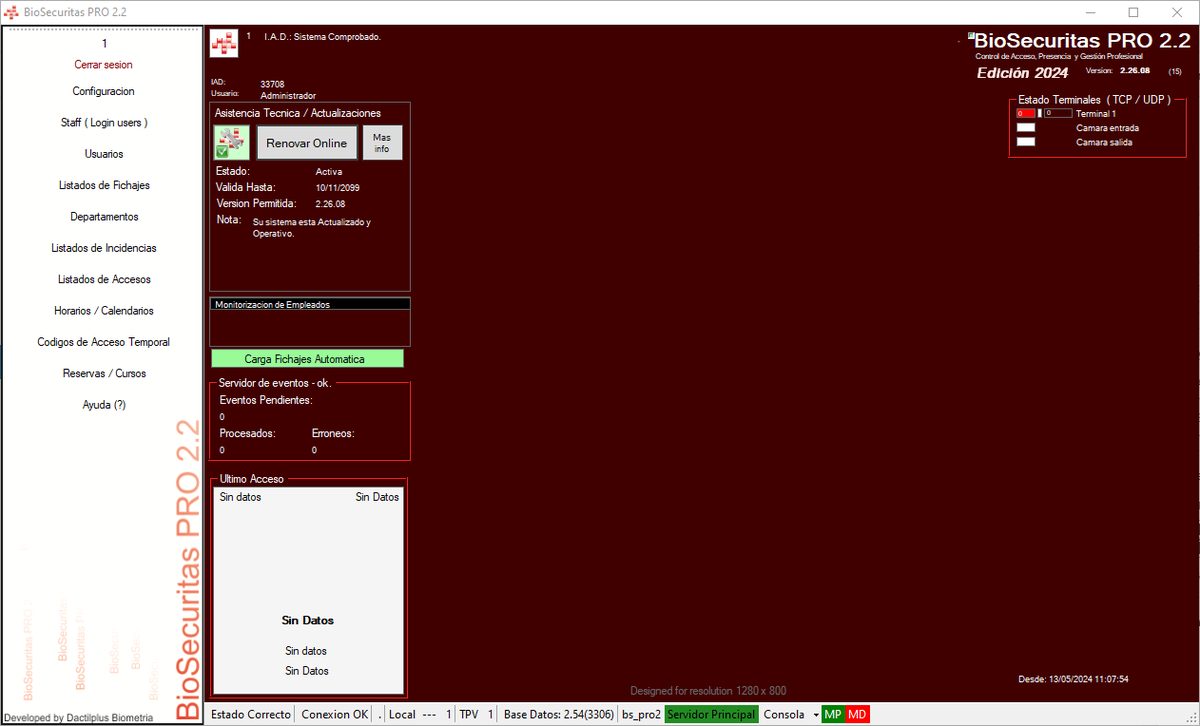
BioSecuritas PRO 2 access control and time attendance software
BioSecuritas PRO 2 [BS PRO 2] , the system for access control, time attendance, sports centre management and management of users and zones using Active RFID, such as tunnels, construction site entrances or hospitals.
Adapted to generate a file to send to the electronic office to record attendance at CAP courses
Adapted to work with automatic ball-dispensing machines for golf courses.
Automatic access management with number-plate cameras in car parks.
With a POS sales area.
Controls up to 20 doors / turnstiles or terminals
Now compatible with SERAPHIM, BSPRO2 App, Golfspain, Golfmanager and Instasoft
Terminals that can be used with BioSecuritas PRO 2:
Biomax 2 Kreta3 Flexy KXP Hanvon FaceID Active RFID RFID UHF Mobile App Number-plate cameras
Our own software, fully adaptable to your needs.
Download Installer (EXE) Download Installer (MSI)The main features of ACCESS CONTROL AND TIME ATTENDANCE include:
– Access control and time attendance and Sports management by fingerprint, proximity card, barcode or ID + Password.
When employees or users arrive at their workplace, they simply place their finger or card on the reader and their clocking will be recorded.
The process for clocking out is the same. You place your finger or card and that's it, the employee or user has recorded their working day.
If that terminal has a door or turnstile associated with it and the user has access permissions ( based on schedule, leaving date, zone, etc. ), the door will open automatically. If the door requires an additional password to be entered, it will ask for it in order to open.
Likewise, if 'Anti-passback' is enabled, they will not be able to enter if the system detects that they are already inside.
– Mobile clocking system
Employees can clock in via mobile on iOS and Android devices with the BSPRO2 App using GPS location for their clockings.
– Management of users and vehicles via Active RFID.
You can control entry to tunnels, construction sites, staff in hospitals, care homes, etc. using Active RFID Radio-frequency readers and TAGs such as key fobs, cards or even wristbands.
It can locate users by zones and control their capacity, and with certain Tags it can even monitor the person's temperature.
BSPRO2 is also ready to show the information on entry desks for tunnels or facilities and on LED displays.
When a Tag is detected, it can be configured to close relays such as doors or alarms.
The system is fully configurable and can be adapted.
– Adding Users, listings and data modification ( up to 10.000 users in the case of fingerprints, unlimited in the case of cards)
It has a simple menu where employees can be added in 2 minutes. Attaching data such as first name, surname, date of birth,
position, schedule, department, section, user type, access zones, schedule, leaving date, account number, etc.
Also serving as a database of employees or users.
It also has employee listings to view or modify their data, schedules, etc. .
– Ability to create unlimited access schedules for employees or users.
You can literally create a specific schedule for each employee or user, there is no limit. The schedule shows the start and end times of the working
days, as well as whether they are working days or not. BioSecuritas PRO 2 automatically calculates the hours worked in excess ( outside the schedule ) and the hours
worked short ( hours that should have been worked but were not )
– Work Calendar.
Customisable Annual Work Calendar system with time slots, holidays, with the ability to create unlimited Calendars, even one per User if necessary.
It also has the option to print calendars to give to the employee.
– Enrolment of user Fingerprints and Cards, checking them on the computer itself using a Nitgen Hamster and a keyboard-emulation Card Reader.
The reader used is USB.
The employee is registered on their computer, without having to go to any room.
– Clockings and incidents on the Biomax2 Device
The employee simply has to place their finger or card on the reader to record their entry to or exit from work.
To record a break for smoking, a doctor's appointment, etc. they just have to press 2 keys to indicate their incident and place their finger.
– Clockings and incidents on the Hamster USB Device
The employee simply has to place their finger or card on the reader to record their entry to or exit from work.
– Listings of Clockings and Access by employee or user between dates, calculation of hours worked, overtime, etc.
In the clockings and access section you can perform customised searches, by employee, between dates, etc.
Aided by listings, you can see the hours worked per day, month, etc… the average entry and exit times, overtime and much more.
– 9 different types of incident, incident listings, time lost on incidents, etc.
Employees waste a lot of time smoking, or going to the doctor, etc. This system is the best way to monitor exactly how much time
they lose on each type of incident. This way you can produce listings of lost time.
– Instant information on the staff currently working or on an incident (going to the doctor, etc.)
It has two menus where you can view live the staff currently working and those who are not. Through listings you
can view your company's attendance in real time.
You can also view the employees currently on an incident and which type of incident ( for example smoking ).
– MySQL database, which gives the application the greatest possible speed and security.
The BioSecuritas database runs on MySQL. A very well-known database engine. This system is one of the fastest and most secure, giving
the application all the data potential it needs, instantly.
– Ability to send instant messages.
Instant informational messages can be sent to the Terminal, as it has a two-line display.
– Access Listing and History.
You can view the staff who accessed the facilities, the time, through which door, etc. even whether the identification was unsuccessful or whether the opening was
manual from the BioSecuritas «Door Control» window. Ability to restrict access by unlimited schedules.
– Latest Records window.
A window in which the last 5 accesses or clockings can be seen, with the user's name and photo.
– Ability to control between 1 and 15 doors.
From 1 to 15 doors can be controlled with Biomax2 devices.
– User and administrator system.
The administrator can limit the use of the program to «observer only», whereby the doors will open with the fingerprint, but the user will not be able to interact with the door controls.
– Temporary Access Code system.
So that temporary users can gain access, limited by number of passes or days.
– Integrated module for managing KRD13Mv2 Readers / Writers
Access Control with Mifare cards using KRD13Mv2 reader/writers.
Management of Mifare cards with a rechargeable balance for access to facilities, management of timed machinery for campsites, hotels, etc.
How does the KRD13Mv2 module work ?
– Automatic online updates.
All Dactilplus systems update automatically over the internet. Each time the application starts, it checks the latest version of the program on our web server, giving you the option to install it. It is the best way to always have the latest improvements and updates for your
system..
The main features of the SPORTS MANAGEMENT include:
– POS Access Identification protected by user + password
Access to the sales area is protected with a user and password so that only authorised staff can access that management area.
– Adding customers or users by fingerprint, proximity card, etc. from the management area.
It has a simple menu where employees can be added in 2 minutes. Attaching data such as first name, surname, date of birth,
position, schedule, department, section, user type, access zones, schedule, leaving date, account number, etc.
Also serving as a database of employees or users.
It also has employee listings to view or modify their data, schedules, etc. .
– Automatic Rates by time slots, Discounts, etc.
There is an option for the prices of items or services to change automatically between nine rates depending on the day or time, as programmed
so that the salesperson does not have to keep track of these matters and does not make mistakes.
– Virtual Keyboard for data entry and salesperson identification by Magnetic Stripe Card, Proximity, Barcode or password.
It is ready to work in touchscreen environments, which is why the software has virtual keyboards in the most frequently used areas of Management and Sales.
– Intuitive sales interface in the POS area.
The sales interface was carefully designed to make selling easier even for inexperienced staff.
– Suitable for use with a barcode scanner gun.
The system is able to sell by reading the barcode of the items directly.
– Extensive operations menu at the bottom of the POS, thus optimising the layout of all items and functions.
The most common operations within the sales area are represented by buttons at the bottom of the window. The items are also
divided into groups or families to make their layout easier
– Cash notes to record all till movements, change, invoice payments, etc
To control the fixed till balance ( Initial float ), cash notes are used to record movements, both incoming, for example
float, and outgoing, such as invoice payments.
– Split Payment system to automatically divide consumptions into different parts.
For those items or services paid for by several people ( for example court hire ), the system divides the amount between the desired parties
and prints that same number of tickets for each party.
– Fully automated and customisable Invoice Creation and Printing system.
An Invoice format can be designed so they can be created automatically from the sales area.
– Manual search for Items by Description or Manufacturer to make sales easier in cases of large volumes of items or references.
It has a system to search for items by description or manufacturer so they can be found more easily.
– Reservation systems for Courts, Pitches or sports spaces
Through the 'Reservations' menu, courts or pitches can be booked.
– Fast and intuitive system for selecting Sports halls, court.
If there are services to be charged to a particular court, when the service ends they can be accumulated on tickets parked against a specific court or pitch.
At the end, the list is retrieved and charged.
– Automatic Offers between Dates system.
Automatic offers allow the price of an item or service to be temporarily modified between dates; when the end date arrives, the system will automatically restore the price.
– Label printing system ( Price, offer date from and to, units, Barcode, etc. )
If you want to generate labels to place on your items for sale, our system has a label-creation menu with barcodes to make payment easier with a barcode scanner gun.
– Ball-dispensing system for golf clubs.
For machines with pulse hopper emptying or ball counting, compatible with instasoft, golfmanager and golfspain.
– Option to connect with a 10,2 » Wifi Tablet PC to take orders and take payment remotely.
For those services charged remotely, a 10.2’’ Tablet PC with wifi can be used.
– Course or Season-ticket management system, with automated listings to send to the bank in the case of direct debit payments.
The software has a Course or Season-ticket management system; you can sign up for them from the sales area using only the card or fingerprint.
You can also check their status from the sales area: people signed up for each course between dates, users who paid for the course, those who did not, etc.
It also has an automatic listing to print a list of the courses or season tickets to send to the bank, with account number, first names and surnames
and amount.
– Temporary Access Code system.
So that temporary users can gain access, limited by number of passes or days.
– Automatic system for Assigning doors and calendars for courses and season tickets.
– Touchscreen graphical interface for sales kiosks and for checking passes and tickets.
– Machine reservation system with a display screen for customers.
– Latest Records window.
A window in which the last 5 accesses or clockings can be seen, with the user's name and photo.
– System for Designing and Printing User Cards including a photograph.
Once the card has been designed, they can be printed automatically when adding the record, printing the desired fields and the photograph.
Latest updates
Recent news and improvements in BioSecuritas PRO 2. It updates automatically.